2026-11-07 05:57:58
181
4
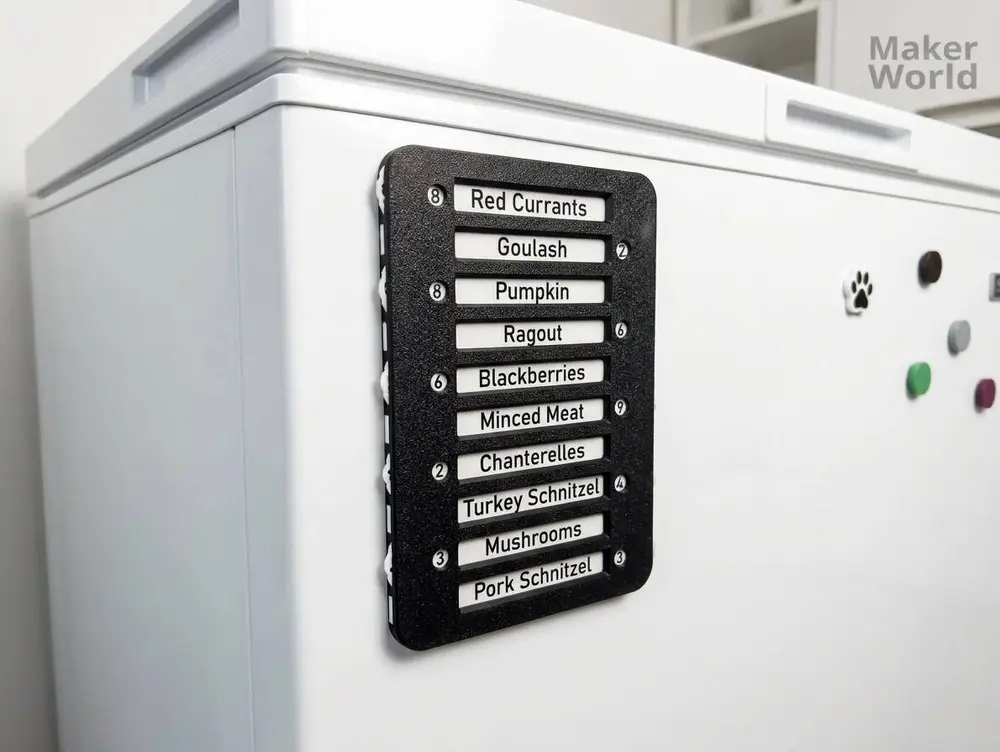
Chest Freezer Organizer & Inventory Counter

@19chris97_3950317
Donate
Message
Follow
Recommended printing method
Add
0.2mm, 15%, 2 walls

Kobra X
Kobra S1 Max
、
Kobra 3
、
Kobra S1
、
Kobra 4
、
Kobra 3 V2
、
Kobra 3 Max
/ Plates:3
/ 7h54m
2
Share


Description
🧊 Chest Freezer Organizer & Inventory Counter
⚠️ Important Note:
Please note that both the counting wheels and the slide-in plaques are designed differently for the left and right sides! Pay close attention during printing and assembly to place the respective parts on the correct side for proper fit and smooth mechanical operation.
✨ Features & Highlights
- 10-Item Counter: Holds up to 10 different categories or food items.
- Tactile Detent Wheels (0–9): Built-in counting wheels snap firmly into place at every number to prevent accidental shifting.
- Removable Plaques: Printable label plaques slide smoothly in and out, featuring practical finger grooves for quick removal.
- Easy Customization: Easily edit and customize your label text directly inside your slicer (e.g., Anycubic Slicer Next, Bambu Studio, PrusaSlicer).
- 100% Support-Free: Optimized for 3D printing — prints completely without support structures.
- Material Versatility: Tested and prints smoothly in PLA or PETG.
💡 Multi-Purpose Inventory Tracker & Mounting
- Versatile Use: Not just for freezer chests! Perfect for pantry organization, workshop storage (screws & hardware), medicine cabinets, or coffee stations.
- Easy Mounting: Attach small magnets or double-sided tape directly to the flat back of the frame to mount it cleanly on your freezer lid, cabinet door, or wall without any extra rails.
🖨️ Print Settings
- Layer Height: 0.2 mm (recommended for smooth detent action and sharp text)
- Infill: 15–20% (Grid or Gyroid)
- Supports: None (Support-free)
- Material: PLA, PLA+ or PETG
💡 Assembly & Customization Instructions
- Import the model files into your slicer (e.g., Bambu Studio).
- Use the Text Tool in your slicer to customize the plaques with your desired items.
- Print the main frame, counting wheels, and plaques (make sure to distinguish between left and right parts).
- Insert the wheels and plaques into their corresponding sides on the frame, stick it to your freezer or desired spot — and you're done!
Happy printing and organizing! If you like this model, please consider leaving a Like or uploading your Make. 👍
Tags
License