
2025-11-15 22:01:14
5.3k
92
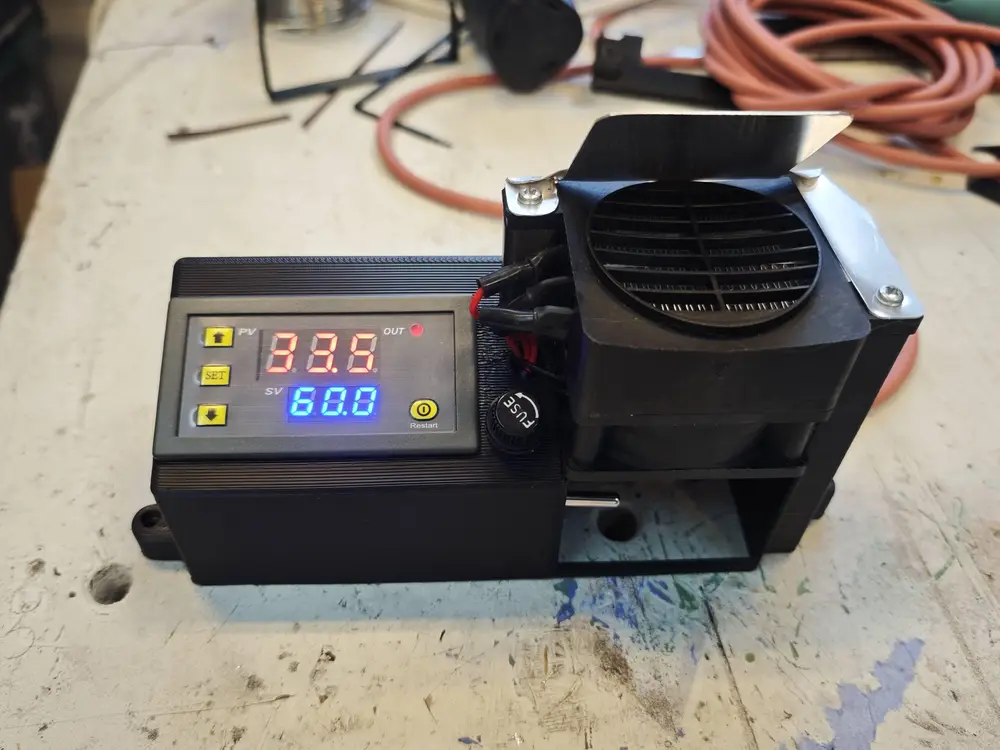
Kobra S1 Chamber Heater (Bauraumheizung)

@n3ro_2836799
Donate
Message
Follow
Recommended printing method
Add
ASA

Kobra S1
/ Plates:1
/ 0m
61
Share


Description
Chamber Heater for Anycubic Kobra S1 – Build Guide
Purpose and Safety Notice
This modification enables stable chamber temperatures for materials such as ASA and ABS.
It involves altering the printer and operating a 230-V heating element.
All electrical work must be carried out by qualified personnel only.
Operate under supervision. Warranty may be voided.
1. Required Parts (Shopping List)
Housing material
- ASA filament
- https://www.amazon.de/dp/B0DB1N93R9
Electrical components
- Heat-resistant cable
- https://www.amazon.de/dp/B07DP1B1CP
- Bimetal thermal cut-off switch
- https://www.amazon.de/dp/B07S9ZMM1P
- Temperature controller (W3230-compatible)
- https://www.amazon.de/dp/B0DGG7PHHB
- PTC heating element
- https://www.amazon.de/dp/B09XV41P7L
- 2 A slow-blow fuse
2. Printing the Heater Housing
- Print the housing in ASA.
- Enable Tree Support for clean overhangs.
- Remove supports and verify that the controller, heating element, fuse holder, and cable routing fit properly.
3. Mechanical Installation on the Kobra S1
- Drill a 7 mm hole in the lower left corner of the printer chassis.
- Purpose: pass-through for the heat-resistant cable.
- Deburr carefully to protect insulation.
- Mount the heater housing using the existing ACE-Pro bracket mounting points.
- Install the heating element so that:
- airflow can move freely across the heating surface,
- no cables or plastic parts are exposed to direct heat,
- no moving components are touched.
- Install a 1-mm metal air deflection plate above the heating element.
- Purpose: direct warm air into the chamber.
- Must be mounted heat- and vibration-resistant.
- The heater assembly is placed on the left side of the printer to keep the full usable build volume.
4. Electrical Wiring
All steps must be performed without power and only by a qualified electrician.
- Route the heater supply line through the 2 A slow-blow fuse.
- Install the bimetal thermal cut-off switch in series with the heating element.
- Disconnects the heater at over-temperature.
- The fan may continue running for residual cooling.
- Connect the temperature controller:
- AC supply to L/N,
- heating element through the relay output (after fuse and bimetal switch).
- Use heat-resistant wiring, proper strain relief, and full insulation (ferrules, terminals, heat-shrink).
- Perform a complete safety inspection before first power-on:
- no exposed conductors,
- no pinched wires,
- safe distance to the heating unit.
5. Temperature Controller Configuration
Parameter Value Description P0 H Heating mode P1 0.5 Hysteresis P2 60 Maximum temperature P3 18 Minimum temperature P4 +6 Temperature calibration P5 0 Start delay P6 65 Over-temperature alarm Recommended chamber temperature for ASA: 40–50 °C.
6. Commissioning
- Verify all wiring with power disconnected.
- Power on and test without printing:
- confirm temperature readings,
- heater switching on/off,
- stable regulation.
- Test the bimetal thermal cut-off only under safe, controlled conditions.
- Ensure chamber temperature never exceeds 60 °C.
- Operate only under supervision; fire-safety measures recommended.
7. Fan Settings for Optimal Heat Distribution
- Exhaust fan: 8%
- Side ventilation fan: 8%
Provides gentle circulation without excessive chamber cooling.
Tags
License
