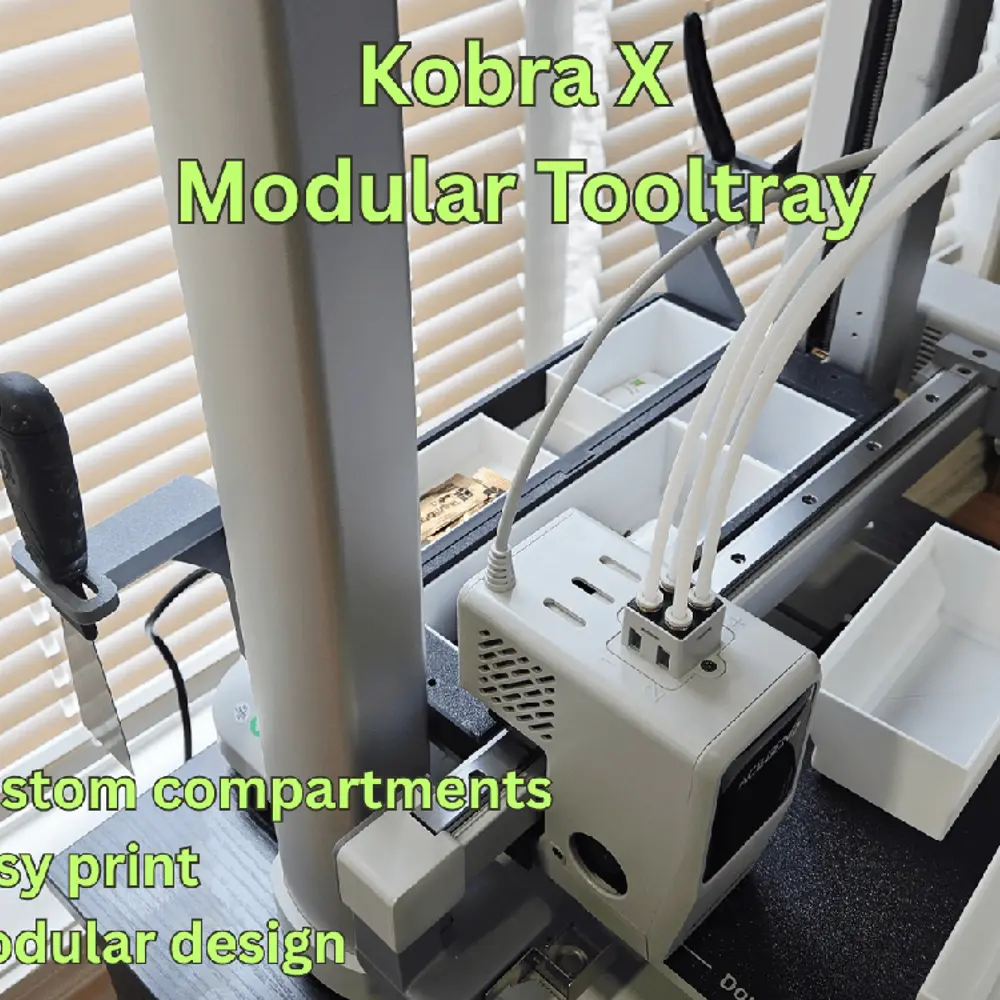
Kobra X modular toolbox and storage


DESCRIPTION
I always like to have some storage with each of my printers where I can place tools and consumables.
The top spools limit the placement of a tooltray at the top so I decided to add one to the gantry. As an added bonus it also covers the extrusions.
The Tooltray offers the following features:
- A modularmain tray which clips over the extrusoins. It can be divided in up to 4 compartments;
- 4 modular compartments for the main tray ranging from 1/4 to full width;
- An addon tray which offers a total of 12 sizes (1/6 to full and single or double storey)
- Clip on attachments for cutters and the scraper (if you want to change the side you need to mirror them).
The tray adds some weight to the gantry. The amount is very small but it may cause the gantry to descend when the printer is not powered.
IMPORTANT: if you plan on using the full print height ensure that any things in the front tray do not protude above the top of the tray as there is only a very small clearance at the top.
ASSEMBLY
Assembly is quite simple. Tolerances are tight to ensure a correct fit.
PLEASE READ AND FOLLOW THESE INSTRUCTIONS TO AVOID ISSUES
An assembly gif is also provided in the photo description above.
STEP 1
Move the hotend to the middle of the gantry and clip on the main tray. There is limited space so you will need to slide it in horizontally and then push it down, ensure both sides are partially engaged in the extrusions and then press down to secure it in place. Tolerances may affect the fit.
IMPORTANT: VERIFY TO MAKE SURE THE HOTEND CAN MOVE SIDE TO SIDE SMOOTHLY - IF NOT THE TOOLTRAY IS NOT FULLY CLIPPED.
STEP 2
Using the screws that came with the printer (3x10 mm) screw in each side of the main tray to the gantry extrusions.
STEP 3
Clip on the rear tray
STEP 4
Clip on the cutter and scraper holder
STEP 5
Select an insert the trays for the main and extra tooltrays
3D PRINTING
IMPORTANT: I upload a print setting files for all my models. The print settings has the parts positioned for correct printing.
I strongly recommended you use my print setting file. If not, I will not be able to assist you if there is an issue when printing. From experience, many of the issues with printing my models are on account of users not using my print settings.
3D PRINT SETTINGS
I use the following settings and materials to print this model:
Infill % : 15% (no need for more)
Nozzle diameter: 0.4 mm
Layer height: 0.2 mm standard
Material: PLA and PETG are fine.
ABOUT ME
I enjoy creating 3d models that others can use and appreciate. It is a very fun pastime. I find it very rewarding to see my models downloaded and printed. I put lots of thought, time and effort to create each model print out multiple iterations to make sure it works just right.
If you liked my model and wish to encourage me please give it a like. If you wish you can also help me with my filament costs. You can also use the discount codes listed below. You will save and I get a small commission for certain purchases. Thank you.
DISCOUNT AND AFFILIATE CODES FOR PRINTER AND FILAMENT
I am continuously trying to get discount codes from various manufacturers. Unlike many affiliate links these give discounts on purchases and are more difficult to obtain. In my requests I ask that they give me the codes with the most discounts for users even if it means a smaller commission.
DISCOUNT CODE LINK: Click here to see the discount codes
HOW TO USE THE CODES
1. You need to CLICK ON THE LINKS. The links are usually set up by countries/regions.
2. Add the items you want to purchase
3. Enter the DISCOUNT CODE at checkout. The codes vary by month and saving – so check back each month for the latest offers.
4. You can only use ONE CODE so be certain to enter the one with the most discount
You are prohibited from sharing, sub-licensing, selling, renting, hosting, transferring, or distributing the digital file or 3D printed versions of this object, as well as any other derivative work in either digital or physical form (including remixes).You are not allowed to use the objects in any manner that involves charging money or collecting fees without permission.