
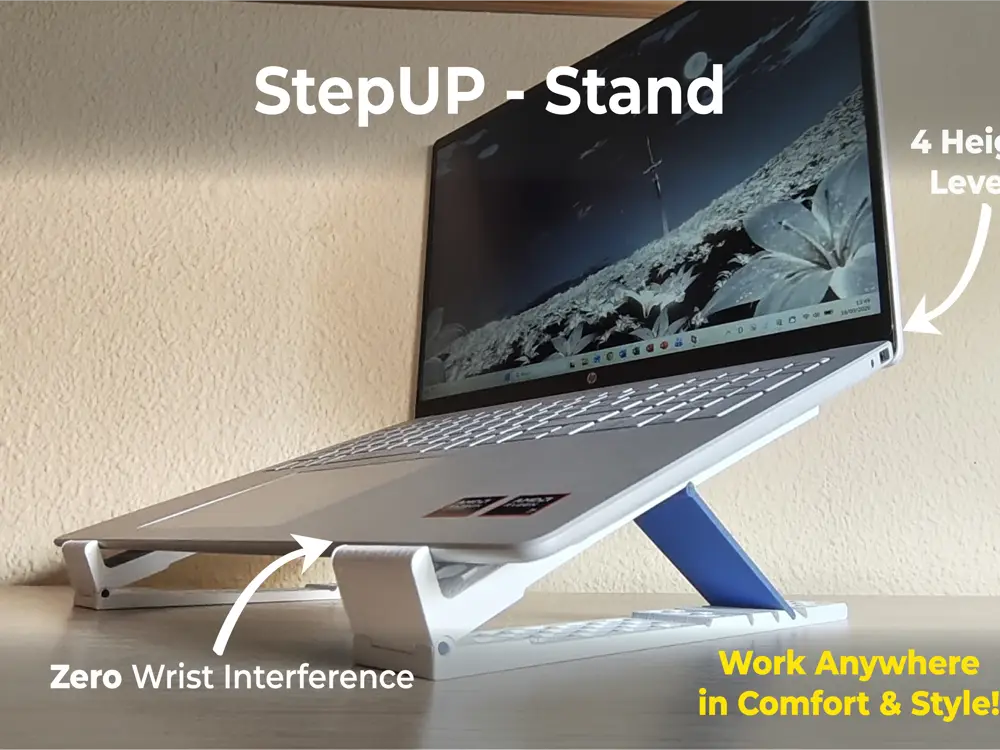
Laptop Stand - StepUP


StepUp — 4-Level Adjustable Laptop Stand
StepUp is a sturdy, compact, and fully 3D-printable laptop stand designed to improve your posture and workspace ergonomics without requiring screws, bearings, or glue.
Whether you need a subtle angle for typing comfortably or higher elevation for video calls and dual-screen productivity, StepUp adapts in seconds.
💻 Compatibility Note:
• Optimized for: Modern slim and mid-profile laptops up to 20 mm thickness at the front lip (e.g., HP OmniBook, MacBook Air/Pro, Dell XPS, Lenovo ThinkPad, ASUS Zenbook, etc.).
• Chunky / Heavy Gaming Laptops: Laptops with extra-thick front chassis (>22 mm) or aggressive wedge-shaped front edges may not seat flush in the low-profile front hooks.
🚀 Key Features
• 4 Adjustable Tilt Angles: Easily switch between 15° · 22° · 28° · 35° to find your ideal ergonomic position.
• Smooth Desk Gliding: Reposition or slide your laptop around the desk effortlessly without having to lift it off the stand or having the arms collapse.
• Ultra-Portable & Flat Folding: The independent rails fold down flat into a slim profile, slipping easily into any backpack or laptop sleeve on the go.
• Zero Wrist Interference: Specially designed low-profile front hooks keep the laptop firmly in place without digging into your wrists while typing.
• 100% 3D Printed Parts: No metal rods, bearings, or screws needed.
• Rock-Solid Press-Fit Joints: Heavy-duty pivot pins designed for a tight mechanical fit that won't loosen or wobble over time.
• Superior Heat Dissipation: Open geometric pattern promotes passive airflow under your laptop to keep temperatures down.
• Tested & Compatible: Tested thoroughly on 16" laptops (HP OmniBook 16") and fully compatible with 13", 14", 15", and 16" laptops or tablets.
⚙️ Recommended Print Settings
• Material: PLA or PETG (PETG is great if your laptop exhausts hot air downwards).
• Layer Height: 0.24 mm for the body. 0.2mm for the rest.
• Walls / Perimeters: 3 or 4 (essential for strength and stiffness in the arms and pin holes).
• Infill: 20% – 30% (Tpms-d or gyroid) (25% on upper arms, 20% on bases, 30% on reinforcement pins)
• Supports: NONE. All parts are designed to be printed flat on the build plate.
• Brim: Optional (only if you have corner warping issues).
🔨 Assembly Instructions
Tools required: A small hammer, rubber mallet, or a firm tap against a hard flat surface.
- Print the base rails, upper arms, struts, and pivot pins.
- Remove the support material from the hinge recesses.
- Align the arm hinge with the base hole.
- Insert the pin and gently tap it into place with a small hammer or mallet.
- (The pins are designed with a tight press-fit tolerance to ensure maximum rigidity and zero wobble under laptop weight).
- Adjust to your desired angle and enjoy your laptop setup!
If you find this design useful, please give it a like 👍
You are prohibited from sharing, sub-licensing, selling, renting, hosting, transferring, or distributing the digital file or 3D printed versions of this object, as well as any other derivative work in either digital or physical form (including remixes).You are not allowed to use the objects in any manner that involves charging money or collecting fees without permission.
