
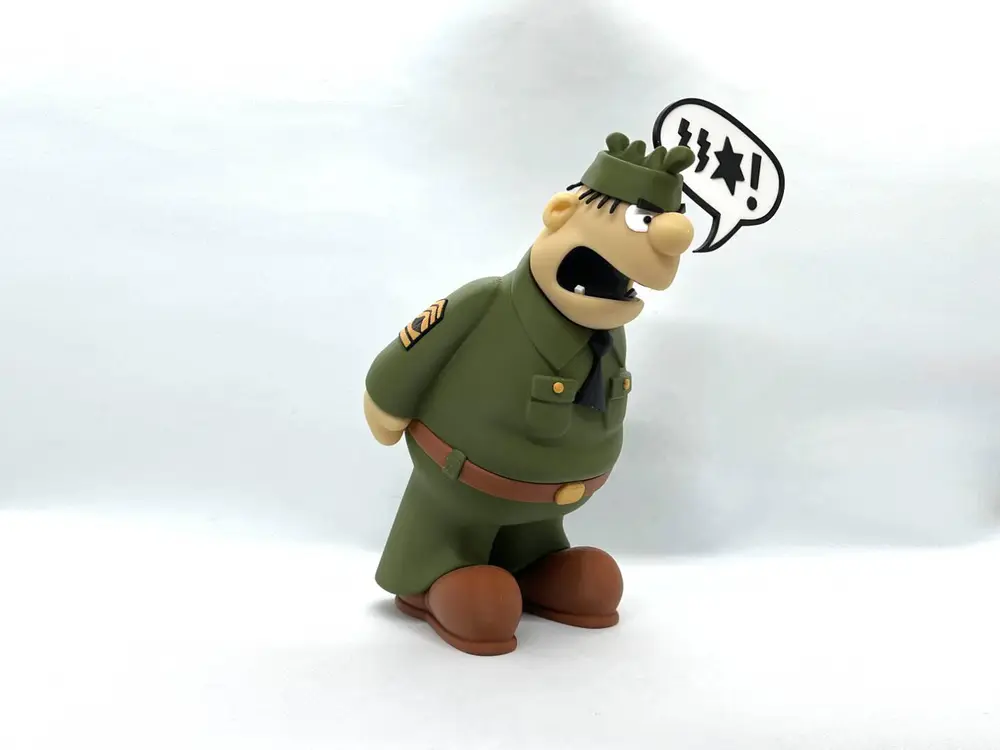
Sergeant Snorkel


Sergeant Snorkel, from Beetle Bailey, an American comic strip created by cartoonist Mort Walker
Sergeant Snorkel is Beetle Bailey's platoon sergeant and nemesis. Sarge is known to frequently beat up Beetle for any excuse he can think of, leaving Beetle a shapeless pulp. Sarge can be alternately short-tempered and sentimental and they share an uneasy comic alliance.
Some minor supports are required on one part, the ear section of the head.
If you have the proper filament colors, no painting is needed.
The assembled model is 225mm tall.
Note: The Beetle Bailey and Sargent Snorkel models are posted large due to some small parts. I printed copies of these two models at 60% (155mm tall) as well as the posted size and found that only one issue came up (patch_black_left/right), which was resolved by using the Arachne perimeter parameter on the smaller version. See the pictures section for both sizes.
Enjoy!
...........................................................................................................
Special shoutout to maker Benoît Lussier for providing QA printing and quality feedback.
...........................................................................................................
Print Instructions:
Supports: YES on one part, see specific instructions below
Rafts: no
Resolution: .2mm
Infill: 15%
Notes:**
Refer to the notes below for a few helpful printing and assembly instructions.
...........................................................................................................
Building the model
Colors
Black: (Devil Designs PLA - Black)
hair
x_black
patch_black_right
patch_black_left
tie
mouth_bottom
mouth_top
eye_blacks (file contains two identical pieces)
eyebrow_right
eyebrow_left
..
White: (Devil Designs PLA - White)
x_white
eye_whites
tooth_right
tooth_left
..
Green: (BambuLabs PLA - Dark Green)
shirt
pants
pants_loops1 (file contains two identical pieces)
pants_loops2 (file contains two identical pieces)
hat
..
Skin: (Paramount3D PLA - Universal Beige)
head
hand_right
hand_left
..
Brown: (BambuLabs PLA - Brown)
belt
shoe_right
shoe_left
..
Gold/Yellow: (Hatchbox PLA - Gold)
buttons (file contains two identical parts)
buckle
patch_yellow_left (file contains five different pieces in order of placement)
patch_yellow_right (file contains five different pieces in order of placement)
..
Any color (hidden parts:
pin_belt
pin_hands (file contains two identical pieces)
pin_hat
..
...........................................................................................................
Printing and assembly tips
Printing tips
1 - Supports ARE required on one part.
(note: some slicers consider the support angle where 90deg is vertical and other slicers consider 0 deg as vertical. I use my suggestions based on 90 deg as vertical)
*supports: organic/tree supports with a reduced threshold of 29 deg were used on:
- head (only the ears require supports)
2 - There are some pieces that may need brims or rafts, use your discretion. When setting up my prints I prefer to be conservative to ensure the least chance of a print failure, especially since the base of many parts are hidden when inserted into another part. Rafts also ensure that the first layer of small parts will have a better fit for my models.
*I did not use any rafts or brims
4 - When removing parts from the printer bed, it's a VERY good idea to place left/right parts into separate containers to help with the assembly process. Sometimes the difference between the left and right parts is very small but it is still worth keeping track of them and assembling them in their proper place.
..
Assembly tips:
1 - Take your time gluing the model together and enjoy the process. Give some thought into which parts to glue together as groups and then gluing the groups together. Let the glue for each group set completely before combining groups.
2 - I used 3D Gloop (strong fast drying) and E6000 (tacky slow drying) glues to put this model together. For both glues using a smaller amount is usually better than more glue.
3 - important for all my models, be sure to dry fit all parts before gluing.
4 - When assembling the head/hat, I suggest gluing the eyewhites to the head and then gluing the eye_blacks before gluing the hat/hair to the head. The eyebrows should be glued in last.
5 - Refer to the assembly diagrams in the pictures section as well as the uploaded pictures for putting the model together. The model is meant to be glued.
Do not hesitate to ask questions, feedback is essential to making better models.
