
2024-06-13 12:08:37
937
94
USB Cable Organizer

@DIYTECHOS_4162478
Donate
Message
Follow
Recommended printing method
+ Frequently Used Printer
More profile
17
Share


Description
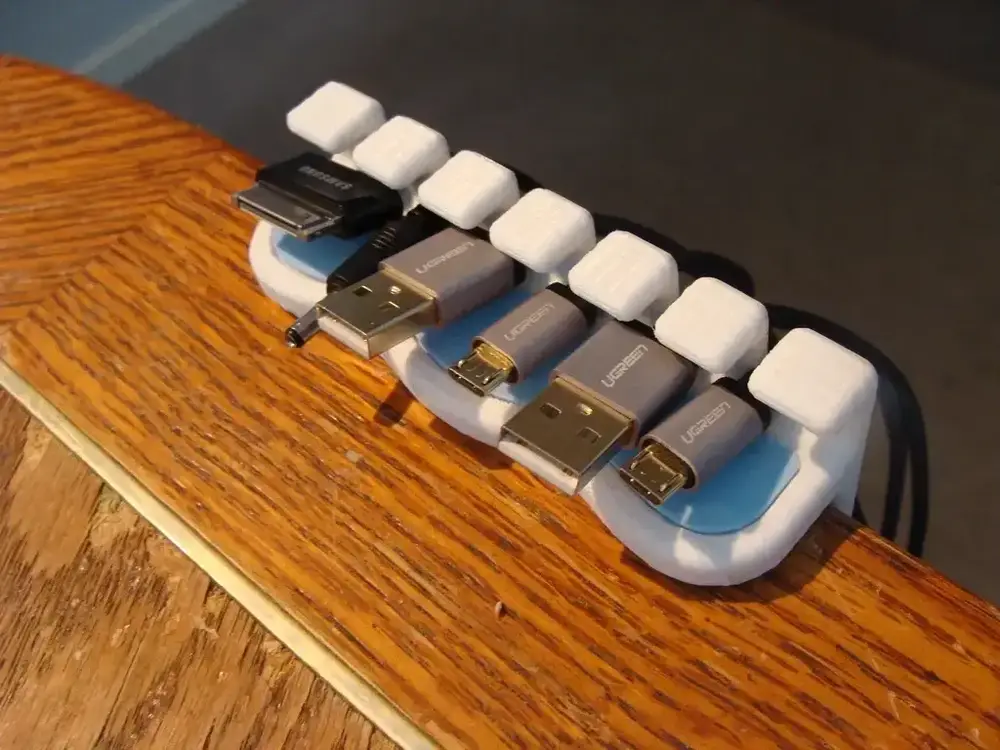
USB Cable Organizer
This USB cable organizer is designed for easy relocation and can accommodate various table thicknesses and cable diameters. There are four versions available: straight and curved designs, each with or without a snap-in insert. This design ensures that your cables are neatly organized and accessible.
Features:
- Multiple Versions: Includes straight and curved versions, both with and without a snap-in insert.
- Adjustable for Table Thickness: Designed for a standard 1.5-inch (38 mm) thick table. Customization for different table thicknesses is available upon request.
- Adjustable for Cable Diameter: Can be modified to fit different wire diameters if necessary.
- Snap-Together Design: The first attempt at a snap-together design, which turned out successful. Feedback is appreciated for further improvements.
Print Settings
- Rafts: No
- Supports: No
- Resolution: 0.2 mm
- Infill:
- Main Bodies: 25%
- Inserts: 100%
Post-Printing
- Cleaning: Ensure you clean up the inserts and the holes for the inserts to ensure a proper fit.
Assembly and Usage Instructions
- Print Preparation:
- Load the desired version (straight or curved, with or without insert) into your slicer and apply the recommended print settings.
- Print the main body and inserts using the specified filament material and settings.
- Assembly:
- For versions with inserts, snap the inserts into the corresponding holes in the main body. Make sure they fit snugly.
- Clean any excess material from the inserts and holes to ensure a proper fit.
- Attachment to Table:
- Slide the organizer onto the edge of your table. Ensure it is securely attached and fits the thickness of your table.
- If your table thickness differs from the standard 1.5 inches (38 mm), contact me for a customized version.
- Organize Cables:
- Insert your USB cables into the designated slots. The snap-in insert versions will hold the cables securely in place.
- Use the organizer to keep your cables neat, easily accessible, and prevent them from tangling.
Customization
- Table Thickness: If your table is a different thickness, message me with the size, and I will try to help you out by providing a customized version.
- Cable Diameter: If you have a different wire diameter, I can modify the design to accommodate it if possible.
Feedback
Please let me know if you encounter any problems or have suggestions for improvement. Your feedback is valuable for refining this design. Enjoy a tidy and organized workspace with this USB Cable Organizer!
Tags
License
