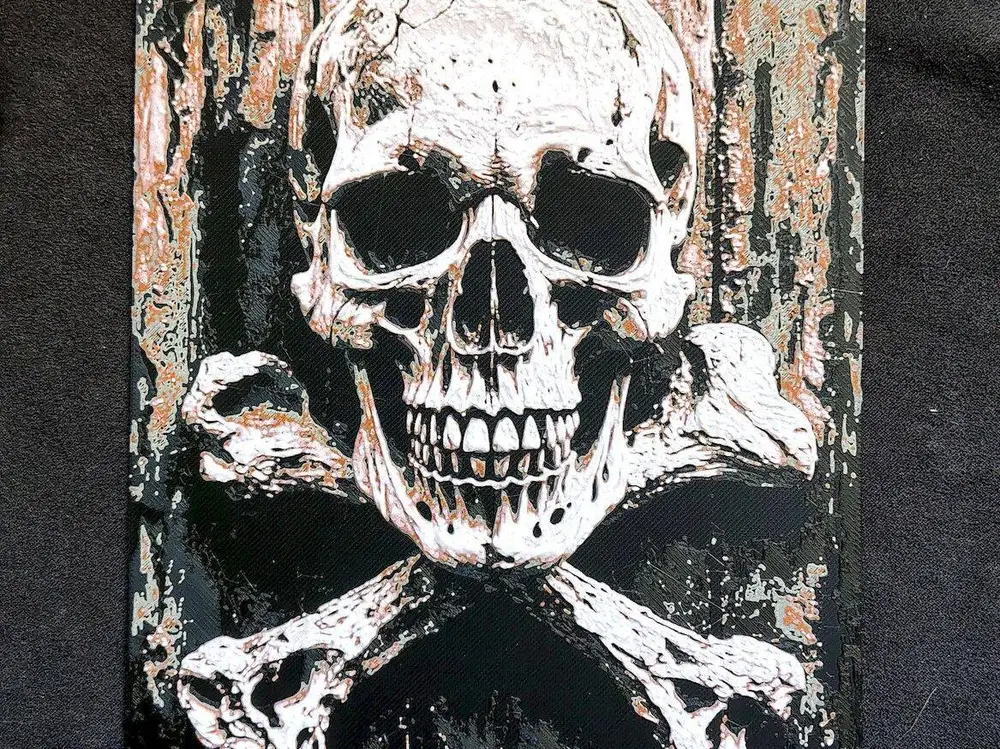
Jolly Roger HueForge


Picture source/author not found.
Then used HueForge v0.9.0 to create the model.
Print at 100% infill with a layer height of 0.08mm with a base layer of 0.16mm.
Model size is 150x200mm. You can only modify the X and Y dimensions. Do not adjust the height (Z) in your slicer! The layers would not be correct. You may print at higher layer heights below the Min Depth of 0.48mm. The Max Depth is 2.24mm and the Actual Depth is 2.24mm.
It is possible to print without material system by manually changing the filament (setting filament change or pause) in the slicer, depending on your printer and sw support.
These were my settings and colors for my print that you see in the picture. Your results may be depending on the filament you use.
Filaments Used:
PLA Anycubic Black Transmission Distance: 0.3
PLA Aurapol Beige Transmission Distance: 2.4
PLA Bambulab Basic Brown Transmission Distance: 2
PLA Elegoo Basic White Transmission Distance: 7
This print uses 4 unique filaments
Swap Instructions:
Start with Black
At layer #9 (0.8mm) swap to Beige
At layer #10 (0.88mm) swap to Brown
At layer #11 (0.96mm) swap to White for the rest.
You are prohibited from sharing, sub-licensing, selling, renting, hosting, transferring, or distributing the digital file or 3D printed versions of this object, as well as any other derivative work in either digital or physical form (including remixes).You are not allowed to use the objects in any manner that involves charging money or collecting fees without permission.