
2025-08-05 00:20:04
7.7k
241
Poops Jenga Tower

@Alessio70_414990
Donate
Message
Follow
Recommended printing method
Add
0.20mm Standard Profile

Kobra S1
Kobra 3
、
Kobra 4
、
Kobra X
、
Kobra 3 V2
、
Kobra 3 Max
/ Plates:5
/ 18h51m
180
Share


Description
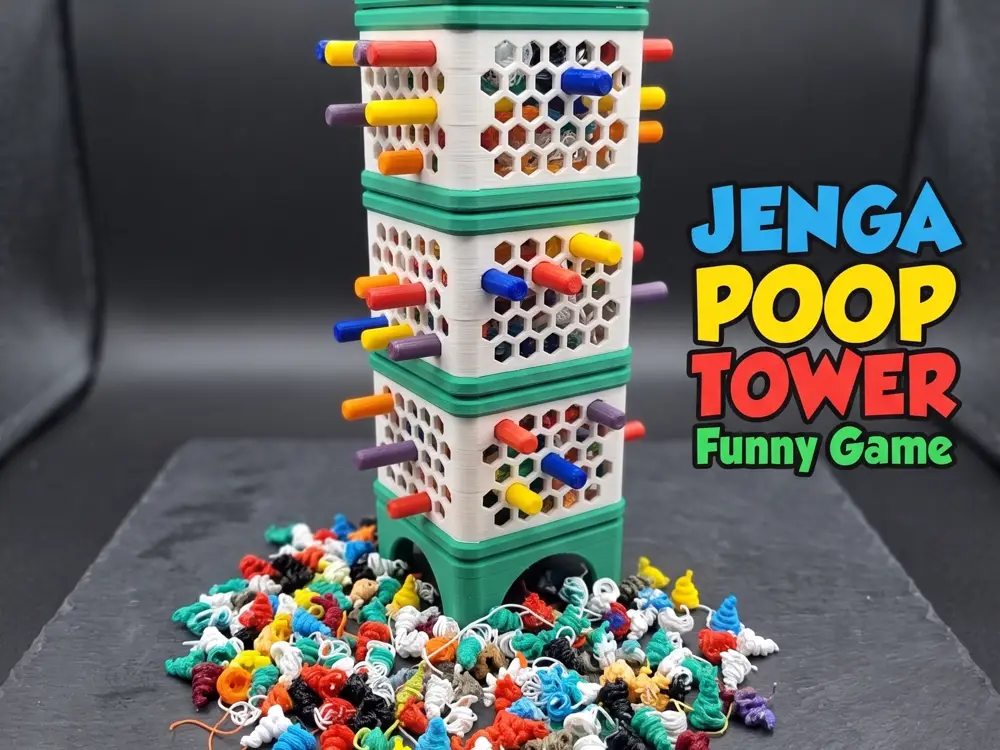
If you have a multi-color printer that generates a lot of waste filament, here’s a game that puts it to good use! You can also print the small WASTE included in the project.
The rules are simple: don't let the waste fall. You can choose the color combinations you like most for both the tower and stick parts
Overview
This game is entirely 3D printed and consists of the following parts:
- Tower Base
- Tower Body 1
- Tower Body 2
- Tower Body 3
- Tower Top
- Stick no less than 20 (you'll need many!)
- Waste you must have at least 10 (if you don't have a multi-coloro printer)
Assembly
The tower is designed for easy assembly; the parts simply slot together. When not in use, you can disassemble it to save space.
Rules
Setup for a round:
- After assembling the tower, insert 4 stick into one of the top rows.
- Each player then takes turns placing 1 stick into the tower until all beams are placed. (The total number of beams is up to you, but we suggest starting with 20-30.)
- Fill the top of the tower with your waste filament (poop). You are now ready to play!
The Game:
- Players take turns carefully pulling 1 stick from the tower. The stick must be in a section or extension that currently holds waste filament.
- If a single piece of waste filament falls from the bottom of the tower during your turn, you lose the game!
Rules (Balanced)
Setup for a round:
- Follow the setup instructions for the original rules above.
The Game:
- Players take turns carefully pulling 1 stick from the tower.
- If any waste filament falls from the tower during your turn, you must collect it.
- The game ends when all the waste filament has been collected by the players. The winner is the player with the most or least waste filament (you choose!).
Printing Instructions
All parts should be relatively easy to print. Here are a few tips:
- Brim: A brim can help with bed adhesion for the tower parts but isn't necessary for the beams.
- Supports: No supports are needed.
- Multi-color: The tower extensions can be imported into your slicer and split into parts, making it easy to color the different segments.
- One color version, print only sigle plate in the color you prefer
Tags
License
Standard Digital File License
This work is licensed under the Standard Digital File License.
You are prohibited from sharing, sub-licensing, selling, renting, hosting, transferring, or distributing the digital file or 3D printed versions of this object, as well as any other derivative work in either digital or physical form (including remixes).You are not allowed to use the objects in any manner that involves charging money or collecting fees without permission.
You are prohibited from sharing, sub-licensing, selling, renting, hosting, transferring, or distributing the digital file or 3D printed versions of this object, as well as any other derivative work in either digital or physical form (including remixes).You are not allowed to use the objects in any manner that involves charging money or collecting fees without permission.
