Testbed Validation models with 1, 9 and extreme 25 pads. Other printers too.


Use this model to test your 3d printer for flat or z-offset issues.
Although it was designed for a Kobra 3 the principles apply to most 3d printers.
I included a 1, 9 and 25 point model for extreme leveling.
Start by printing the 1 square in the center of the bed.
If you can't print a simple square in the center of the bed then trying to print anything else is a waste of your time and filament.
The printer uses the center of the bed for Z-offset calibration so let's get this right first.
Each square is 25x25mm and is 0.5mm thick. This is just 2 layers.
If this square is not printing 0.5mm thick then you probably have an Z-offset issue.
You may have to print it a couple of times to make sure it's repeatable.
If it's not repeatable your printer probably has some other issues.
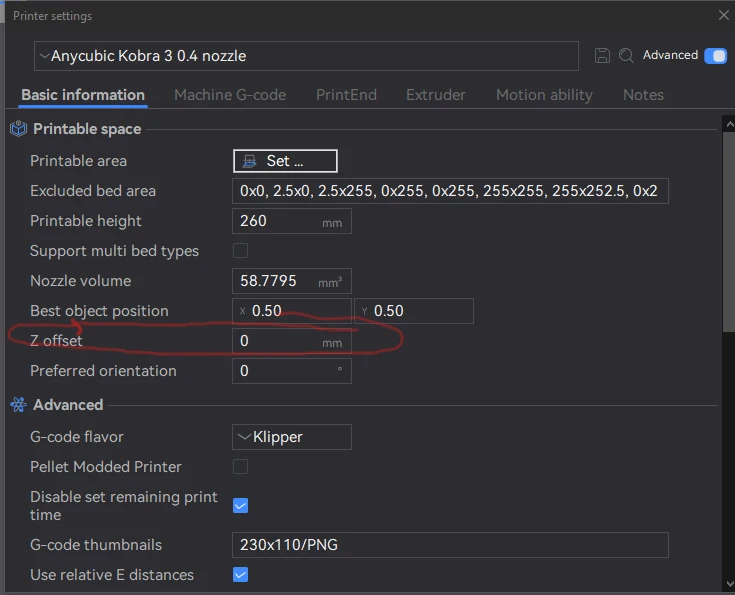
If any of the squares print out thinner or thicker and is repeatable then you need to adjust the Z-offset in the slicer or the printer.
You add or subtract the height in the slicer until you get the 0.5mm print. It may take a few tries.
While you can adjust the Z-offset at the printer you would have to do that for every print and that can cause other issues.
Once the Z-offset is set correctly, you can print the 9 point model.
Each of those 9 squares should also be 0.5mm thick.
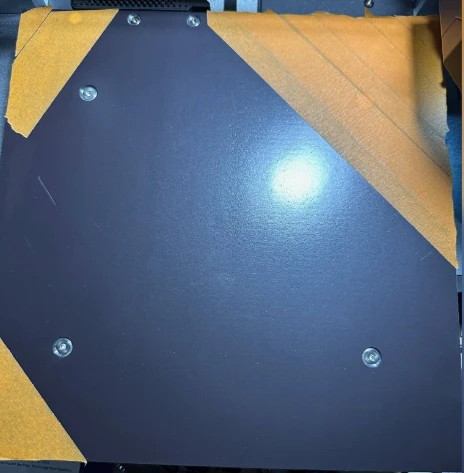
If any of the squares are greater than 0.5mm you can add some tape to the bed to raise it up to reduce the thickness.
I found anything more that 0.65mm will have issues with bed adhesion.
Usually it just the corners that need some small adjustment but it can need more.
Do not put tape on the spring steel print bed.
Copper Tape Here
Affiliate Link: https://amzn.to/4jxzM4M
Aluminum Tape Here
Affiliate Link: https://amzn.to/3WA4Xmh
This is very good at documenting a warped bed!
Start with the 9 point and later use the 25 point if you really want it super level.
You will need some calipers.
I recommend Clockwise tools but anything with 0.00mm measurement will work.
Affiliate Link: https://amzn.to/4hcfLz3
Painters tape is ~0.125mm thick. You can also try Aluminum or copper tape which is ~0.10mm thick. Tapes that conduct heat well are better.
I put some on the magnetic bed under the spring sheet. This allows you to remove the spring steel print surface without issues.
In my case a 2 inch strip at a 45 degree angle in the upper left corner. After printing again the upper right corner was now 0.52mm,
I repeated that for the lower left corner with same result.
For the upper right corner I had to put a few additional layers of tape (3) until I got close to the 0.50mm height.
All my pads now print >0.50mm and <0.55mm and prints are sticking very well.
FYI too many pieces of tape will limit the heat on the top of the print surface and may require a hotter bed.
Use a laser gun to measure the bed temp if in doubt.
You can use the included STL to make up your own pattern too.
Please comment and give a like if you like what you see.
If you see something you think might need modifying then comment and I will see what I can do for you.