
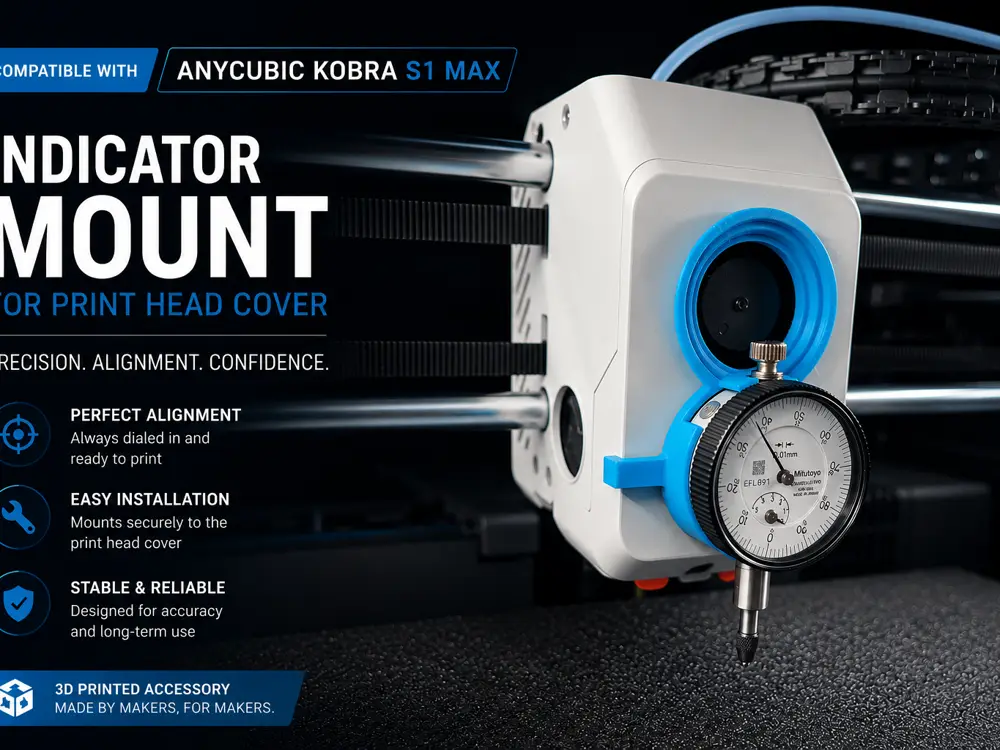
Dial Indicator Mount for Anycubic Kobra S1 Max


Transform your printer into a true precision calibration machine.
This compact Dial Indicator Mount is designed specifically for the print head cover of the Anycubic Kobra S1 Max, allowing fast and repeatable bed alignment using a standard dial indicator.
Built for makers who care about first-layer perfection, mechanical accuracy, and reliable large-format printing.
Why This Model Exists
Most large-format printers rely entirely on automatic compensation.
That works… until it doesn’t.
When printing large parts, engineering components, or multi-hour projects, even tiny bed inconsistencies become visible:
- inconsistent first layer
- edge lifting
- dimensional inaccuracies
- uneven nozzle pressure
- wasted filament and time
This mount gives you something firmware cannot:
real mechanical verification.
Attach your dial indicator in seconds and manually inspect bed flatness with professional precision.
Because sometimes the best calibration tool is still physics.
Dial Gauge specs
Dial gauge case diameter = D 38 mm
Dial gauge rod: D8 mm
Features
- Designed specifically for Anycubic Kobra S1 Max
- Fast installation directly on the print head cover
- No permanent printer modification required
- Lightweight and rigid construction
- Stable indicator positioning
- Compact design with excellent visibility
- Optimized for easy printing without supports
- Ideal for advanced bed tramming and diagnostics
Perfect For
- Precision calibration
- Mechanical bed inspection
- Troubleshooting first layer issues
- Large-format printing optimization
- Engineering and dimensional prints
- Makers obsessed with perfect tolerances
Printing Recommendations
Material:
- PLA+
- PETG
- ABS/ASA recommended for enclosed high-temperature environments
Layer Height:
- 0.20 mm
Infill:
- 35–45%
Supports:
- Required
Installation
- Print the mount
- Insert your dial indicator
- Attach it to the print head cover
- Move the toolhead across the bed
- Measure real surface deviation with high precision
Simple. Fast. Extremely effective.
Why It Stands Out
Most calibration accessories are universal.
Universal usually means compromise.
This model was designed around the exact geometry of the Kobra S1 Max print head cover to achieve:
- cleaner fit
- better rigidity
- improved repeatability
- professional-looking integration
Useful Flatness Calibration Guide
Enjoying the model?
If this design made your day a bit better or your print setup cooler, and if you’re feeling generous, you can buy me a coffee on Ko-fi.
Your support helps me keep creating and sharing more awesome stuff.
Support me here: https://ko-fi.com/adrian_m2025
Thanks a ton — and happy printing!
If You Like This Model
- Download
- Like
- Follow
- Add it to collections
- Share your setup photos and remixes
Every interaction helps this model enter and remain inside the Exclusive Model Program rankings faster.
Made by makers, for makers.
您不得分享、转授权、出售、出租、托管、转让或分发该数字文件或该对象的3D打印版本,以及以数字或物理形式存在的任何其他衍生作品(包括混音)。未经许可,您不得以任何方式使用这些物品进行费用收取。
