
HexaGear Fidget – Single & Double Planetary


⚙️ HexaGear Fidget – Single & Double Planetary
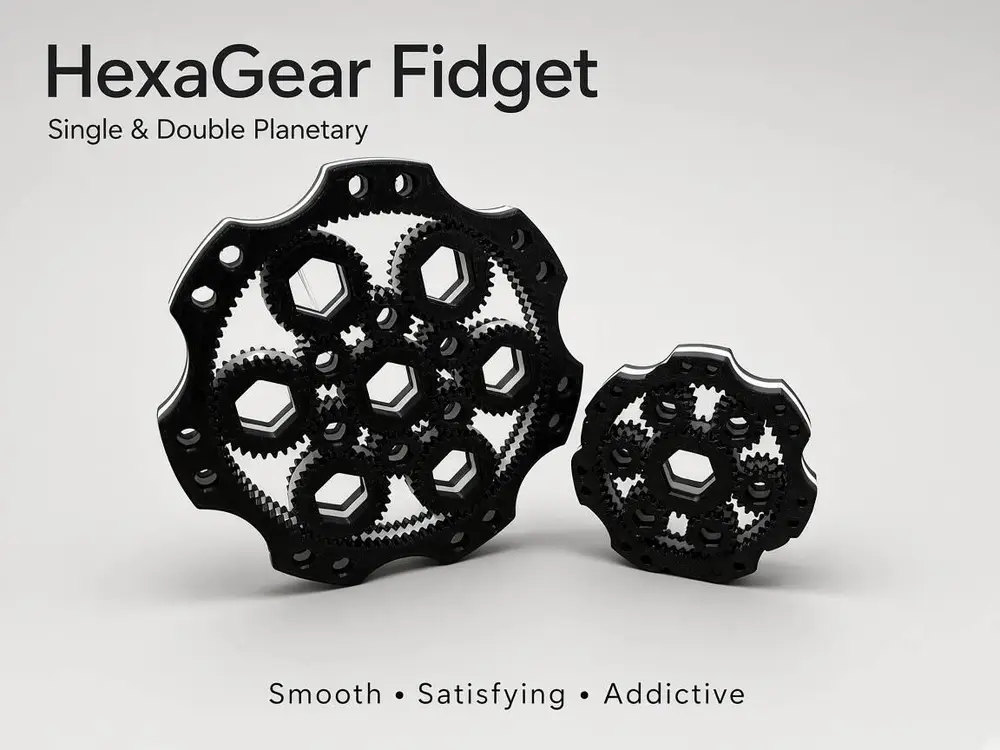
HexaGear Fidget is a mechanical Print-in-Place fidget inspired by planetary gear systems. The design combines multiple intermeshing gears into a compact, fully functional mechanism that provides smooth, satisfying and addictive movement.
The project includes two different versions, allowing you to choose between a more compact design and a larger, more complex mechanism.
⚙️ Single Planetary
The smaller version features 6 planetary gears arranged around the central gear system. Despite its compact size, it provides a surprisingly complex and satisfying mechanical movement.
⚙️ Double Planetary
The larger version is approximately 1.2× bigger and features 6 planetary gears in a more complex double planetary arrangement. The additional gear interaction creates a more dynamic visual effect and a different feeling while rotating the mechanism.
Both versions are designed as Print-in-Place models, meaning the complete mechanism can be printed as a single piece without assembling individual gears.
🖨️ Recommended Print Settings
- Nozzle: 0.4 mm
- Layer Height: 0.2 mm
- Walls: 3–4
- Material: PLA
- Supports: ❌ Not required
- Brim: ⚠️ Not recommended
- Assembly: ❌ No assembly required
- Design: ✅ Print-in-Place
The models are specifically designed for support-free, Print-in-Place FDM printing.
⚠️ Important – Brim
A brim is not recommended for this model.
If you decide to use a brim, it is extremely important to remove it completely after printing.
Pay particular attention to:
- the spaces between the gears,
- the gear teeth,
- the areas around the planetary gears,
- and all other moving parts.
Even a small piece of leftover brim can lock the gears and prevent the Print-in-Place mechanism from working correctly.
Do not force the mechanism if it is blocked. Carefully inspect the gears and remove any remaining filament first.
🔧 After Printing – Important
Since this is a Print-in-Place mechanical model, the gears may initially feel tight immediately after printing. This is normal.
After removing the model from the build plate:
- Carefully inspect the entire mechanism.
- Remove any strings or small pieces of excess filament.
- Check that there is no material remaining between the gear teeth.
- Gently flex and loosen the mechanism by hand.
- Slowly move the gears back and forth.
- Gradually increase the range of movement until the mechanism starts moving freely.
The mechanism may require a little manual break-in before it reaches its smoothest operation.
⚠️ Do not use excessive force. The goal is to gently loosen the printed connections and gears, not to force them apart.
After a short break-in period, the mechanism should become noticeably smoother and more enjoyable to operate.
✨ Features
- ⚙️ 6 planetary gears
- 🔄 Print-in-Place mechanism
- 🖨️ Prints as one complete piece
- 🚫 No supports required
- ❌ No assembly required
- 🌀 Smooth and satisfying mechanical movement
- 👁️ Complex visual gear interaction
- 📐 Two versions: Single & Double Planetary
- 📏 Double version approximately 1.2× larger
- ♻️ Optimized for PLA
- 🎯 Designed specifically for FDM 3D printing
- 🔧 Simple post-print break-in
Print it. Break it in. Spin it. Enjoy it. ⚙️🌀
您不得分享、转授权、出售、出租、托管、转让或分发该数字文件或该对象的3D打印版本,以及以数字或物理形式存在的任何其他衍生作品(包括混音)。未经许可,您不得以任何方式使用这些物品进行费用收取。
