
DICE TRAY, TABLET HOLDER and STORAGE BOX


Dice rolling on the table can easily become messy during a game session.
Dices roll everywhere, the phone or tablet used for rules has no place to stand, and small accessories like tokens or pens often get lost.
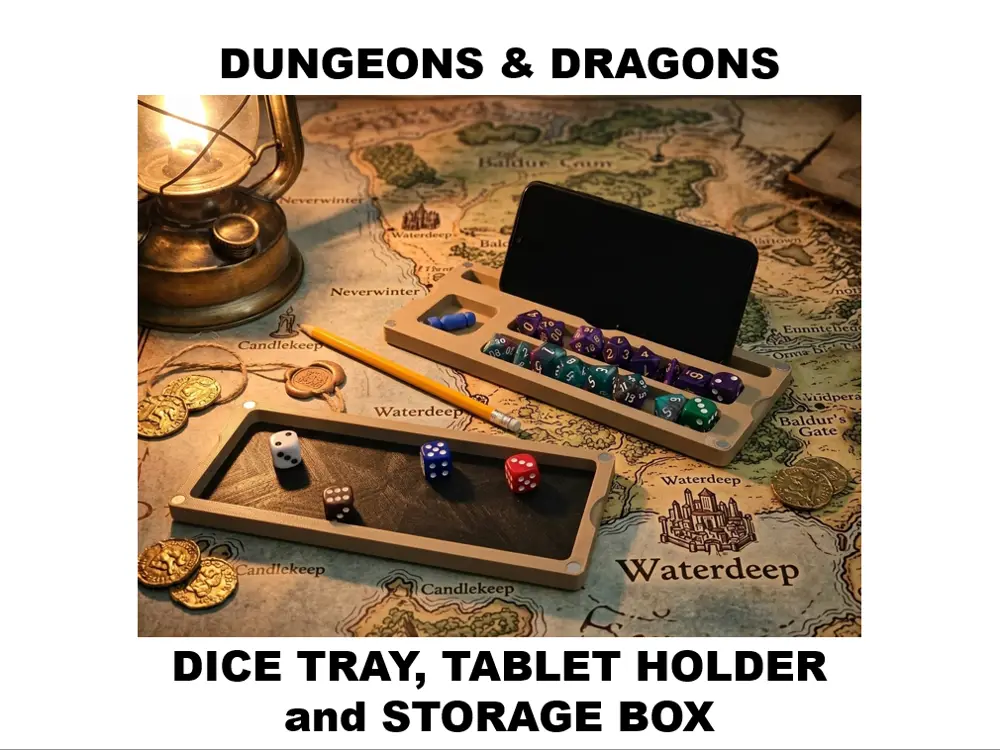
To solve this, I designed a compact dice box that also works as a dice tray and organizer, keeping everything in one place during your game sessions.
The model includes dedicated slots for dice sets, a compartment for spherical dice or tokens, and a slot that works both as a pen holder and a phone/tablet stand.
The second half of the box works as a dice rolling tray, preventing dice from rolling away from your play area.
I designed this model in Fusion 360 with the goal of creating a practical and elegant accessory for tabletop RPG players.
I hope you enjoy using it as much as I enjoyed designing it! 🎲
──────────────────────────────
🧱 Composition
The model is made of two main parts:
• Organizer side
Two dice lines that can hold two dice sets (around 8–9 dice per line)
A dedicated slot for a token or spherical D100/D60 dice
A pen holder that also works as a phone or tablet stand
• Dice tray side
A rolling tray designed to keep dice contained during rolls.
The two parts close together using magnets.
💡 The uploaded print profile includes two variations of the dice tray side: one featuring the Dungeons & Dragons text, and one without any text.
──────────────────────────────
🧩 Optional Part
The model also includes an optional TPU strip designed to fit inside the dice tray.
Its purpose is to reduce the noise when rolling dice and improve impact absorption.
It can be: press-fit, or secured with a few drops of glue.
──────────────────────────────
🛠️ Assembly
To assemble the box you will need:
8 magnets (8×3 mm) - 4 magnets per side
Depending on the magnet tolerances, they may not fit perfectly tight.
If needed, use a small drop of glue to secure them in place.
In my case, measuring them with a caliper, I noticed that some magnets were slightly irregular, so glue may help keep them fixed.
──────────────────────────────
⚙️ Recommended Settings
Material: PLA or PETG
Optional tray insert: TPU ( cannot be used with Ace Pro, you must use external spool holder )
Number of slow layers: 2
Infill: 10–15%
Supports: not required (if oriented correctly)
Skirt: optional
──────────────────────────────
🖨 Tested Printers
Anycubic Kobra 3 Combo 👉 Link
Anycubic Kobra 3 V2 Combo 👉 Link
──────────────────────────────
🎁 Special Anycubic Discount
By purchasing through my affiliate link, you can use the following exclusive coupon code:
🧾 Coupon: WLOUTRVZCM
🎉 $20 OFF your order

I’d like to be transparent and clarify that I used AI tools only to improve the quality of the photos and to refine instructions.
To avoid any misunderstanding, I want to assure you that the model itself has been physically printed multiple times to test, refine, and validate the design before publication.
The goal has always been to release the model in the most accurate and polished version possible. I designed it in Fusion 360, and it is one of my first projects created with this software.
You are prohibited from sharing, sub-licensing, selling, renting, hosting, transferring, or distributing the digital file or 3D printed versions of this object, as well as any other derivative work in either digital or physical form (including remixes).You are not allowed to use the objects in any manner that involves charging money or collecting fees without permission.
