
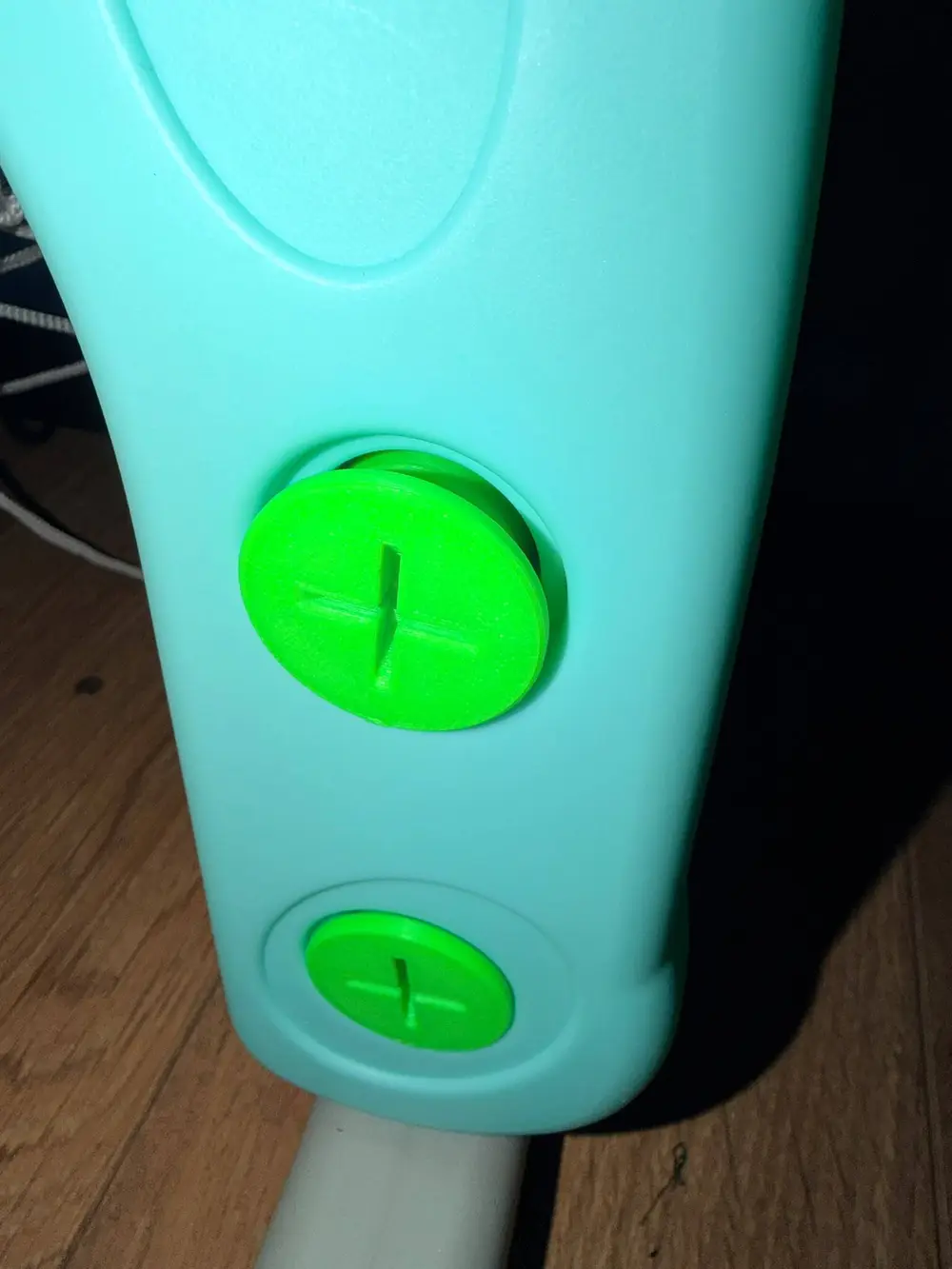
Replacement nut for a kids’ 4-in-1 basketball hoop (TY326530), plus a method for copying toy threads


This is a replacement for the threaded cap/nut on a children’s 4-in-1 basketball hoop. The original thread is a non-standard moulded toy thread, so nothing off the shelf fits. I measured the toy, worked out the thread, and modelled it in Fusion. The nut has a 26 mm outside diameter so it fits back into the original 28 mm bore, a flanged top, and an internal thread that runs smoothly onto the original part.
Thread specification (this toy)
- Single start, right-hand
- Pitch: 5.0 mm
- Toy thread major diameter: about 21.3 mm
- Toy thread depth: about 2 mm
- Toy crest width (at the top): 2.8 mm
- Nut bore (ridge tips): 17.6 mm
- Nut groove width: 3.4 mm
- Nut ridge thickness: 1.6 mm
- Nut groove root: 21.8 mm diameter
- Wall behind the thread: 2.1 mm solid
- Outside diameter: 26 mm
Print settings
- PETG recommended (tougher than PLA for something a child will twist)
- Print with the thread axis vertical
- Layer height 0.12 to 0.16 mm
- Enough walls to make the wall behind the thread fully solid (about 6 to 7 at 0.4 mm)
- No supports needed inside the thread
How to recreate this for a different toy thread
1. Measure the male thread
- Major diameter: callipers across the crests.
- Root diameter: across the shaft between crests if you can reach it, otherwise major diameter minus twice the thread depth.
- Crest width: callipers on a single ridge.
- Number of starts: look at the end of the shaft. One thread start is single start; several starts evenly spaced is multi-start (much more common on jar lids than toys).
- Note the profile: moulded toy threads usually have flat tops, rounded edges and slightly tapered sides, not a V.
2. Get the pitch right (this is the hard part)
Pitch is the distance from a point on one ridge to the same point on the next ridge. Two traps caught me out:
- Measuring outside edge to outside edge across 3 ridges gives 2 pitches plus one crest width, not 2 pitches.
- Tapered, rounded ridges make crest width hard to measure, and any error goes straight into the pitch.
A cleaner calliper method: measure outside across 3 ridges (A) and across 2 ridges (B). Pitch = A minus B.
Best method: print pitch gauges. Make a set of small flat combs, each with 3 teeth spaced at a different pitch (for example 5.0 to 6.8 mm in 0.2 mm steps), with the pitch value embossed on each. Teeth about 1.8 mm wide at the base, 1.4 mm at the tip and 1.6 mm tall suit a thread with a roughly 2 mm gap. Press each comb along the thread, parallel to the axis. The correct one seats all three teeth flat; the ones either side rock on a crest. Check that the neighbouring sizes clearly don’t fit, especially if the winner is at the end of your range. I used an AI tool to make a version of this for this application, you can find that model here.
A wrong pitch shows up as a thread that starts fine but gets progressively tighter with each turn.
3. Model the nut in Fusion
Fusion’s Thread tool only offers standard sizes, so use the Coil tool.
- Model the nut body with a central bore equal to the toy’s root diameter plus about 0.3 mm clearance.
- Create an offset plane about 5 mm outside the open end of the nut and sketch a circle the same diameter as the bore, concentric with it.
- Create > Coil: type Revolution and Pitch, diameter = bore diameter, pitch = your measured pitch, angle 0 degrees, section Square, section position Outside, operation New Body. Set revolutions so that revolutions times pitch is at least 30 mm, so the coil runs right through both ends of the nut. A coil that starts or stops inside the nut leaves a blind groove and the nut won’t thread on.
- Section size: about 3 mm. A Square section sets width and depth together, so it will cut deeper than needed. That’s fixed in a later step.
- Widen the groove: Modify > Move/Copy, select the coil body, tick Create Copy, and move it along the nut’s axis. The offset = (pitch minus desired ridge width) minus section size. For example, with 5.0 mm pitch and 1.6 mm ridges: (5.0 minus 1.6) minus 3.0 = 0.4 mm. Copying the body rather than drawing a second coil keeps both helices exactly in phase.
- Modify > Combine: target the nut, use both coil bodies as tools, operation Cut.
- Rebuild the wall: the deep square cut will have thinned the wall dangerously (my first version had a 0.5 mm skin, which explained why it cracked). Sketch two concentric circles on the open end of the nut, one at the groove root diameter (toy major diameter plus about 0.5 mm) and one at the nut’s outside diameter. Extrude that ring along the threaded length with operation Join. This fills the groove back out to the correct depth and leaves a solid wall.
- Fillet the groove root corners about 0.5 mm, where each ridge meets the wall. This strengthens the ridge base and suits the rounded edges of moulded crests.
- Check with Inspect > Section Analysis through the axis: you should see evenly spaced ridges of the intended thickness and a solid wall behind them.
4. Test before printing the full part
- Print a short slice (5 to 6 mm tall) containing 1 to 2 turns of thread.
- If it squeaks or binds, increase the Move/Copy offset in 0.2 mm steps.
- If it rocks or feels sloppy, reduce it.
- Only print the full nut once a slice runs on smoothly.
- If the fit is fine for the first turn but gets tighter with each turn, the pitch is wrong; go back to the gauges.
Tips
- Keep at least 2 mm, ideally 2.5 to 3 mm, of solid wall behind the thread root.
- Printed holes usually come out 0.2 to 0.4 mm undersize, so allow for that in the bore.
- If the outside diameter has to fit into a moulded socket, measure across the mould seam, not just the smooth part of the bore. Sanding the seam flash is often easier than shrinking the part.
- Since kids will hang on and twist toys like this, test the finished part with a firm twist yourself before handing it over.
You are prohibited from sharing, sub-licensing, selling, renting, hosting, transferring, or distributing the digital file or 3D printed versions of this object, as well as any other derivative work in either digital or physical form (including remixes).You are not allowed to use the objects in any manner that involves charging money or collecting fees without permission.
