K1系列多色升级包 - 缓冲器支架 | K1 Series CFS Upgrade Kit - Buffer Bracket


>> 模型介绍 | Model Introduction >>>>>>>>
虽然不喜欢多色打印,但CFS毕竟也是供料,能做续料盒子,还是咬咬牙买了!不得不说选择创想三维是对的,最终还是给老用户带来了惊喜,给K1系列做了多色升级,这点一定、必须加以点赞!入手前反反复复看了好多次安装视频,总觉得有个点格格不入,没有错!就是这个点让我无法接受——都是改装件到最后竟然给缓冲器贴了个背胶就贴上去,而且如此贴法不是将CFS盒子的最优摆放位置限定在打印机左边了吗,最重要的是我打印机左边刚好没有空位,这个必须差评,希望创想三维能好好反省!
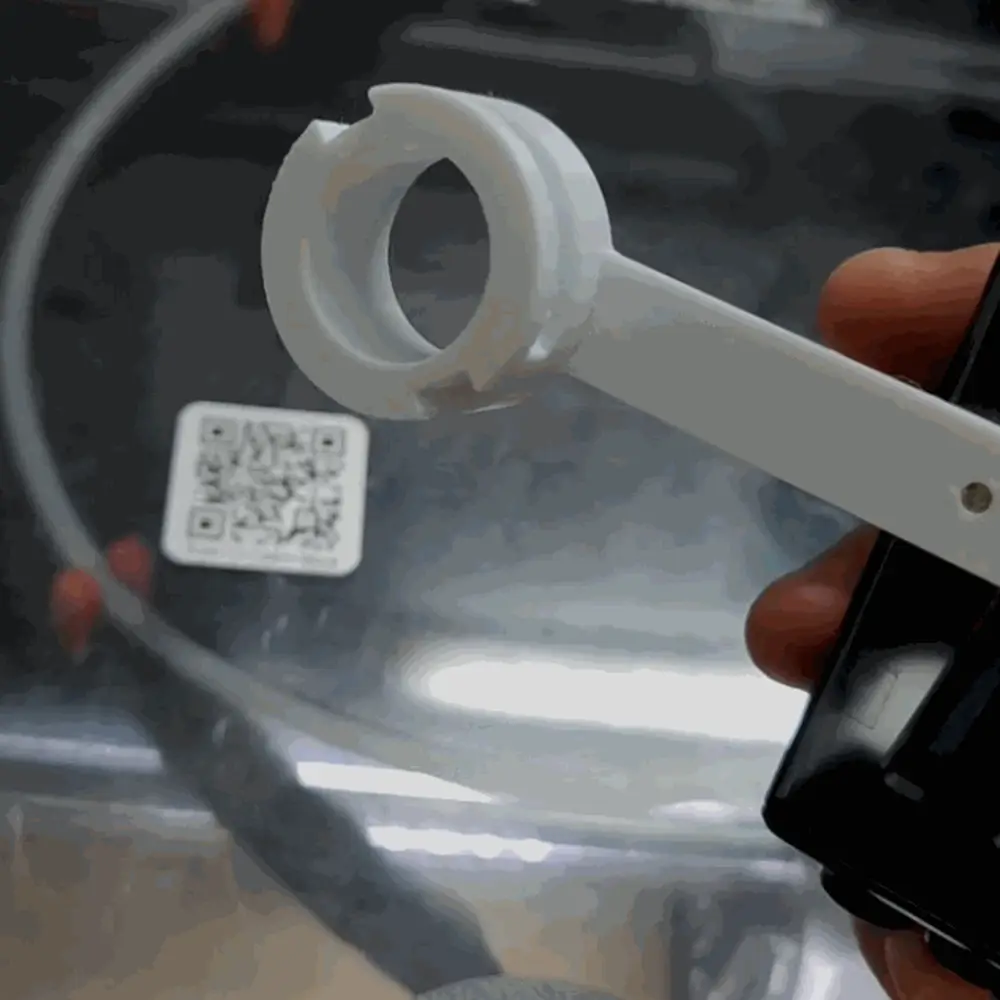
趁着刚买的CFS盒子和K1系列多色升级包没有上机改装前,立马动手打造,利用原先单卷支架留下的口造了个缓冲器支架。虽然本来想着做个活动件的,但是,发现缓冲器上原本就留着螺丝孔(明显创想三维这是在省料,差评再+1!),冲着这两个螺丝口做了个简单的面板拧上螺丝固定完工,进线口向下不就没有了位置放置的限制了吗,当然还能可以根据自己的CFS摆放位置对支架位置进行靠左靠右调整哈,简单小物件,不喜勿喷,要怪就怪创想三维哈🤣。
Although I'm not a fan of multi-color printing, the CFS feeder is still a feeding solution that supports continuous filament supply. So, I gritted my teeth and bought it! I have to say, choosing Creality was definitely the right decision—it's truly impressive how they continue to surprise long-time users by offering a multi-color upgrade for the K1 series. This deserves a big thumbs-up!
Before purchasing, I watched the installation video countless times, and something kept bothering me. And yes—I was right not to feel right about it! My issue is this: using double-sided tape to attach the buffer feels unacceptable. Not only does this method limit the optimal placement of the CFS box strictly to the left side of the printer, but in my case, there’s absolutely no space on the left side of my printer at all. For this reason, I must leave a negative comment and sincerely hope Creality will reflect on this design choice.
Since I hadn't yet installed the newly purchased CFS box or the multi-color upgrade kit onto my K1 series printer, I immediately got to work modifying things. Using the existing mounting holes from my previous single-spool holder, I created a dedicated bracket for the buffer. Originally, I intended to make an adjustable (movable) mount, but then I noticed the buffer already had pre-drilled screw holes—clearly indicating this part was designed to be screwed in (another cost-cutting move by Creality, another negative point ⚠️). Based on those screw holes, I made a simple mounting plate, secured it with screws, and finished the installation. By orienting the cable entry downward, the positional limitations were completely eliminated. Plus, you can now adjust the bracket left or right based on where you place your CFS box.
It's just a small DIY modification—no need to take it too seriously. If anyone's upset about it, blame Creality! 😄🤣
>> 打印配置 | Print Settings >>>>>>>>
(仅参考,可自定义)
(Referential, Customizable as Needed)
耗材 Filament:PETG
填充 Infill:15%
填充图案 Infill Pattern:网格 Grid
支撑 Support:需要 Required
Brim/Raft: NONE
>> 组装说明 | Assembly Instructions >>>>>>>>
即打即用,简单组装。
Ready to use upon installation; simple assembly required.
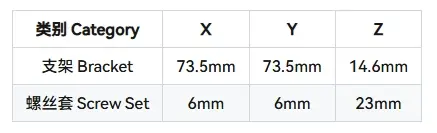
缓冲器原本留有螺丝口,但是柱体为6mm,螺丝孔又是3mm的,想象不出来是什么螺丝。所以为了更好适配M3螺丝,给它加了螺丝套。由于我只有M3*30mm的螺丝,所以螺丝套高度为23mm的,请根据自己的螺丝进行调整。
The buffer originally has screw holes, but the post is 6mm in diameter, and the screw hole itself is 3mm — it's hard to imagine what kind of screw was intended for that. So, to better accommodate M3 screws, I added screw inserts. Since I only had M3×30mm screws available, the height of the screw insert is set to 23mm — please adjust according to the screws you are using.
还有,强迫症玩家请在升级前打印哈。🤣
Also, OCD players please print this out before upgrading. 🤣
缓冲器的空位处得给收缩动态(详情看这https://wiki.creality.com/zh/printers-general-documents/FR2851),不然CFS不能进退料,还会闪红灯报错!
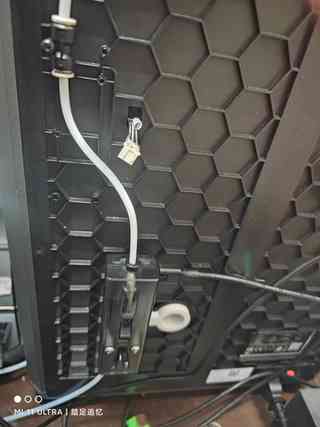
将缓冲器连接到双通口的铁氟龙管做个弯曲让其有个伸缩空间,不要直直对着双通口。
这就是第2版中面板长度缩短的原因。当然,第1版仍旧可以用,只不过要调整双通口位置。(如图所示)
The buffer compartment must maintain dynamic clearance for compression cycles (https://wiki.creality.com/zh/printers-general-documents/FR2851). Otherwise, the CFS will fail to feed/retract filament and trigger red error alerts!
Connect the Teflon tube from the buffer to the dual port with a bend, so that it has some space for expansion and contraction — do not point it straight at the dual port.
This is why the panel length was shortened in Version 2. Of course, Version 1 can still be used as well, but the position of the dual port needs to be adjusted.(Please see the picture for details)
>> 其他说明 | Additional Notes >>>>>>>>
1. 模型使用 Blender 4.4.3制作。
The model was created using Blender 4.4.3.
2. 可根据协议 CC BY-NC-SA 4.0 自行修改为所需样式使用。
You are free to modify it as needed to suit your desired style under the terms of the CC BY-NC-SA 4.0 license.
3. 无论如何,遇见是缘分,能用是巧合,欢迎点赞加收藏,感谢关注和助力!
Regardless of fate bringing us here, it's a happy accident that I could help—click like and save this post! Many thanks for your following and the boost!
4.本篇英文翻译出自于DeepSeek。
This English translation is powered by DeepSeek.
>> 声明 | Statement >>>>>>>>
由于个人时间和精力有限,本人仅通过个人注册的平台和账号以及个人拥有的域名(PoweredBy.CN)发布模型相关信息。其他非个人注册、授权的平台和账号发布涉及到本人制作的模型图纸均和本人无关且无任何利益关联。本人在互联网上一直秉承着“自由分享,免费共享”的理念,对已公开发布的模型图纸不会以任何理由限制下载(包含但不限于收费制、会员制、积分制等限制),请注意甄别!
欢迎您通过下载、点赞、关注、收藏、助力的方式表达您对模型的认可和喜爱,同时也非常感谢您对模型的点评。
您若同意并遵循知识共享许可协议“CC BY-NC-SA 4.0”,本人欢迎您对模型页面进行任何形式的站外分享,也非常赞同和认可您对模型进行升级改造后的再分享行为。
Due to limited personal time and energy, I only publish model-related information through personally registered platforms, accounts, and my owned domain (PoweredBy.CN). Any content involving model designs created by me that is posted on non-personal or unauthorized platforms/accounts is unrelated to me and involves no financial or beneficial association. I have always adhered to the principle of "free sharing and open access" online. For publicly released model designs, I will never impose restrictions on downloads (including but not limited to paid subscriptions, membership requirements, point systems, etc.). Please exercise caution and verify the sources.
You are welcome to express your appreciation for my models through actions such as downloading, liking, following, bookmarking, or boosting my work. I sincerely value your feedback and constructive critiques.
Provided that you agree to and comply with the Creative Commons Attribution-NonCommercial-ShareAlike 4.0 International License (CC BY-NC-SA 4.0), I warmly welcome you to share the model pages externally in any form. Additionally, I fully support and endorse the act of sharing the models after they have been modified or enhanced.