
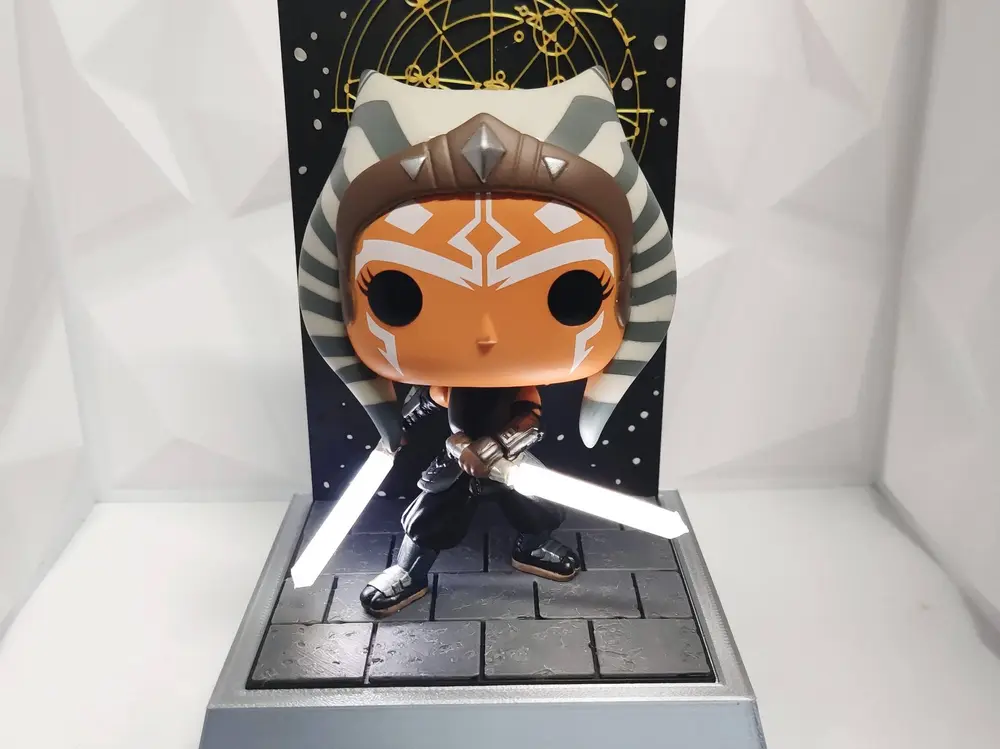
Ahsoka Tano Funko Pop Display Stand – LED Filament Lightsaber Ready


Display stand and backdrop designed specifically for the Ahsoka Tano Funko Pop #464.
This base is inspired by the Peridea Star Map aesthetic, featuring a tiled platform and layered backdrop pattern styled after the ancient map design seen in Ahsoka.
The design supports dual LED filament lightsabers and includes hidden internal space for wiring and batteries, keeping everything clean and self-contained.
Printing Notes
The stand base was printed in Silver Silk PLA for a metallic finish, but it can be printed in any colour to match your theme.
• The tiled floor uses a simple colour swap to highlight the pattern
• The background swaps from white → black → gold to recreate the Peridea map look
• No AMS required — manual layer swaps work perfectly
• You can also print everything in grey and paint/weather it if preferred
LED-Ready Design
The base includes:
• Hidden wire pass-through holes behind the figure
• Internal space for a 2x AA battery holder
• Rear cutout for a toggle switch
• Screw mounts for securing battery holder and base cover
Everything stays fully enclosed inside the base — no visible wiring from the front.
Electronics Used
• 2x 38mm 3V White LED Filament (6000K recommended)
• 2x Empty glowstick tubes (required for blade structure)
• 0.1mm enamel-coated copper wire
• 2x AA battery holder
• Toggle switch
Installation Instructions – Dual LED Saber Upgrade
1. Carefully remove the original plastic sabers from the figure.
2. Drill into each saber hilt using a 2mm drill bit.
Drill slowly and straight — just deep enough to seat the wiring.
3. Solder enamel-coated wire to each end of both LED filaments.
Keep solder joints small and clean.
4. Cut the glowstick tubes to length, empty the contents, then slide each tube over a filament.
Secure with a small drop of super glue at the base.
Lightly sand or shave the tips if you want a rounded saber finish.
5. Insert the wired filaments into the drilled hilts and secure with glue.
6. Route the wires neatly down the back of the figure so they’re hidden from the front view.
Use small dabs of glue to hold them in place.
7. Feed the wires through the hidden pass-through holes in the base.
Inside the base:
8. Solder both negative filament wires to the battery holder’s negative terminal.
9. Solder both positive filament wires to one side of the toggle switch.
10. Solder the battery holder’s positive wire to the other side of the switch.
11. Secure the battery holder and base cover using screws.
12. Install batteries, flip the switch, and enjoy Ahsoka’s sabers glowing with a clean, steady 6000K white light.
您不得分享、转授权、出售、出租、托管、转让或分发该数字文件或该对象的3D打印版本,以及以数字或物理形式存在的任何其他衍生作品(包括混音)。未经许可,您不得以任何方式使用这些物品进行费用收取。
