
ACE - KOBRA 3 OVERHEAD MOUNT


IMPORTANT: This model is for V1 - DO NOT PRINT. NEW VERSIONS V2 (LINK) AND THE ULTIMATE VERSION (LINK) HAVE BEEN RELEASED. HOWEVER THE MOUNT SHOULD WORK WITH THE NEW KOBRA V2.
DISCONTINUANCE OF SUPPORT - PLEASE BE INFORMED THAT I NO LONGER WILL BE PROVIDING SUPPORT FOR THIS MODEL AND I WILL NOT RESPOND TO PM OR TO POSTS AND COMMENTS FOR THIS MODEL.
I AM SORRY TO HAVE TO DO THIS BUT UNFORTUNATELY I DO NOT HAVE THE TIME TO PROVIDE INDIVIDUAL SUPPORT TO EACH PERSON THAT DOWNLOADS THIS MODEL
ALSO NOTE:
- THIS MODEL WORKS AND CAN BE PRINTED WITHOUT ISSUES. LOOK AT THE NUMBER OF DOWNLOADS - ALL ISSUES HAVE BEEN CORRECTED BY NOW.
- THIS MODEL HAS BEEN REPLACED BY V2 AND BY THE ULTIMATE VERSION. IT SHOULD NOT BE PRINTED AND IS BEING KEPT FOR SPARE PARTS PURPOSES ONLY;
- THERE ARE INSTRUCTION PICTURES AND A PRINT PROFILE. IF YOU LOOK AT THE PICTURES AND USE THE PRINT PROFILE YOU SHOULD NOT HAVE ISSUES;
- IF YOU ARE HAVING ISSUES, CHECK YOUR PRINTER, BUILD PLATE, FILAMENT AND OTHER SETTINGS AS THE ISSUE IS ON YOUR SIDE NOT THE MODEL.
- I CREATE MODELS BUT I DO NOT PROVIDE TECHNICAL SUPPORT FOR AC PRINTERS.
THANK YOU FOR YOUR UNDERSTANDING
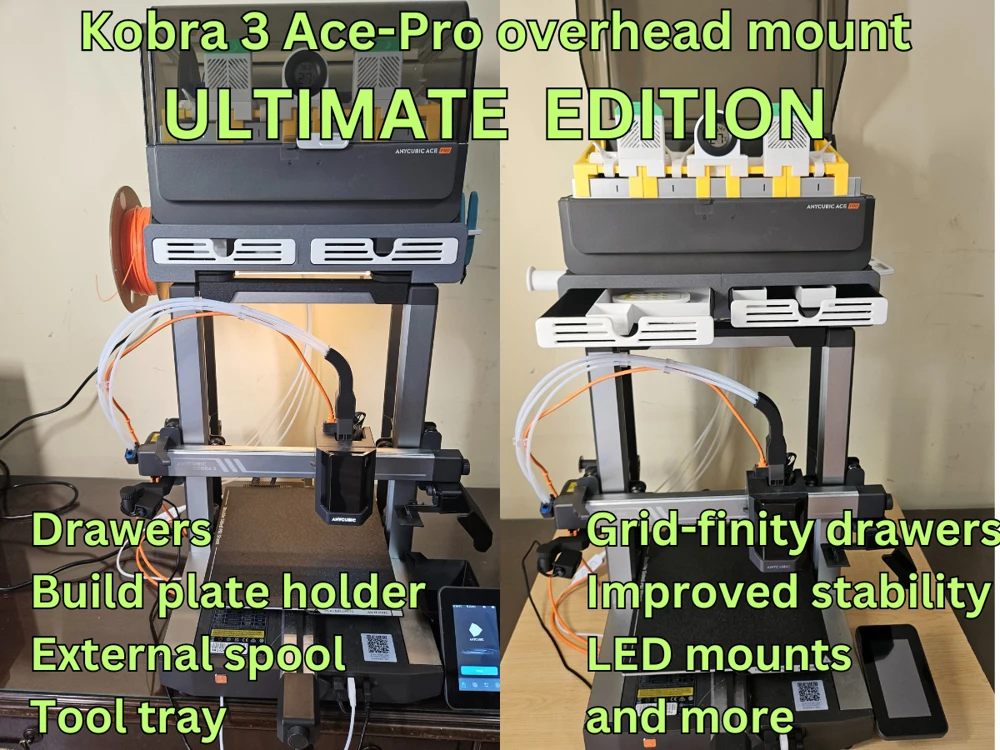
The Ultimate version offers all of the features of V1 and V2 with the following improvements:
- Two large drawers with GRID-FINITY style compartments (the compartments can be downloaded for free on Makeronline);
- Build plate holder for two or more buildplates;
- Side mounted tool tray (can be can be downloaded for free on Makeronline);
- Side mounted External spool holder (can be downloaded for free on Makeronline);
- LED clips for mounting LED under the Ace-pro overhead mount;
- Re-designed and improved rear extension feet for improved stability;
- Dovetail mounts the sides of the bottom brackets for custom add-ons.
- No external hardware or glue needed for assembly (this is optional)
CLICK FOR LINK TO ULTIMATE VERSION.
CHANGE LOG:
1. 2024-08-31 I corrected the raw STL file "Left bottom post" and "Right bottom post". The new STL is "Left hand bottom post V2" and "Right hand bottom post V2". Use the Print profile in Step 5.
2. 2024-09-01 I modified the top plate model to give a bit more clearance for the front screw as I was informed that for some the belt may rub on the screw extension. I do not have this issue but some may. If you printed the part, verify if the belt rubs. You do not need to reprint the part as the screw near the front is optional and the top shelf will hold with the 2 back screws. You can also cut off or trim the front screw extension. If you want to reprint, I uploaded new stls "Right hand top plate V2" and "Left hand top plate V2". I also revised the related print files. Use the Print profile in Step 5.
3. 2024-09-01 I modified the "Support 45" print profile to correct a part orientation. Use the Print profile in Step 5
4. 2024-09-01 I increased the cavity size on the middle post where it connects to the top plate by 0.005 inches as I received comments about the fit being too tight. The raw file "Middle Post 2" has been added. I will leave the original STL if any of you want a tighter fit. Use the print profile in Step 5
5. Added a new print profile for Anycubic Slicer Next "Ace Overhead 2024-09-08" to correct the screw hole size - Please verify supports prior to printing and let me know if there are any printing issues.
The following upgrade may be useful: KOBRA 3 - ACE BOWDEN TUBE GUIDE Click for Link
The following upgrade may be useful if the rear of the Overhead mount is near a wall : KOBRA 3 TO ACE CABLE PROTECTOR - GUARD Click for link
If you want bolt down pads for the Kobra-3: KOBRA 3 - BOLT DOWN FOOT PAD Click for Link
An improved poop-bin. IMPROVED KOBRA-3 POOP BIN Click for Link
I uploaded a model for a set of anti-tilt rear brackets. These are optional but may provide some additional peace of mind. Click for Link
Here is a link for a side mount support to store your hot ends. Click for Link
I uploaded a model for an improved adjustable camera for the stock Anycubic USB camera. Its angle can be adjusted. Click for Link
Here is a link for a handy side mount support upgrade to store your cutter. Click for Link
Are you looking for a Dual Ace Stand? This is the link for my Dual Ace stand. The bottom Ace has rollers for easy roll-in and roll-out. Click for Link
If you find any issues or have suggestions please let me know. The objective is to have a fully functioning unit.
I have been using the Kobra-3 without issues since I received it. My only issue was space as the Ace needs to be on the left side of the Kobra-3 and I am planning on getting a 2nd Kobra-3 - Ace combo. I designed this overhead mount to mount the Ace on top of the Kobra-3. The designs is very rugged and I had no issues with printing or with the Bowden tubes.
The only hardware that is needed is 3 no. 8 flathead wood screws about 0.75 inch long. You can use it without these too but the screws are a better option.
Instructions are provided in the model photos.
You may want to add my Cable protector if the rear of the ACE is near a wall. Click here for download link or look at my models
Enjoy!.
3d Printing
Print profiles are included. Support is only required for the back of the bottom posts.
About me
I enjoy creating 3d models that others can use and appreciate. It is a very fun pastime. I find it very rewarding to see my models downloaded and printed. I put lots of thought, time and effort to create each model print out multiple iterations to make sure it works just right.
If you liked my model and wish to encourage me please give it a like. If you wish you can also help me with my filament costs. You can also use the discount codes listed below. You will save and I get a small commission for certain purchases. Thank you.
DISCOUNT AND AFFILIATE CODES FOR PRINTER AND FILAMENT
I am continuously trying to get discount codes from various manufacturers. Unlike many affiliate links these give discounts on purchases and are more difficult to obtain. In my requests I ask that they give me the codes with the most discounts for users even if it means a smaller commission.
HOW TO USE THE CODES
1. You need to CLICK ON THE AFFILIATE LINK. The links are usually set up by countries/regions.
2. Add the items you want to purchase
3. Enter the DISCOUNT CODE at checkout. The codes vary by month and saving – so check back each month for the latest offers.
4. You can only use ONE CODE so be certain to enter the one with the most discount
You are prohibited from sharing, sub-licensing, selling, renting, hosting, transferring, or distributing the digital file or 3D printed versions of this object, as well as any other derivative work in either digital or physical form (including remixes).You are not allowed to use the objects in any manner that involves charging money or collecting fees without permission.
